Logo
Sign in
Submit a request
  1. Front End Insights
  2. FEI User Manual
  3. How to Enable Third Party Cookies

Menu

Articles in this section

  • RI-BIT Cookie Exception - IE
  • RI-BIT Cookie Exception - Firefox
  • RI-BIT Cookie Exception - Edge
  • RI-BIT Cookie Exception - Chrome

RI-BIT Cookie Exception - Edge

A close up of a sign

Description automatically generated

Edge (New CHromium Version)

  1. On your computer, open Google Chrome.
  2. At the top right, click the three dots.                                                                                          
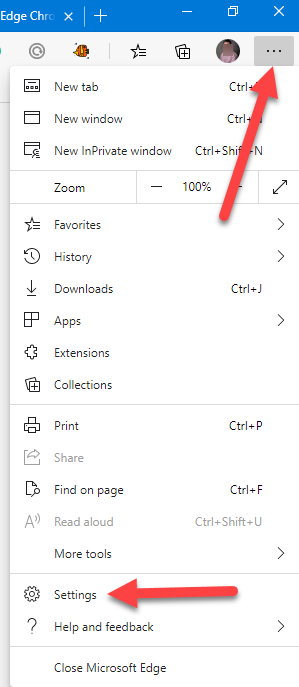
  3. Then click  Settings.
  4. In the "Privacy" section, click Site permissions.
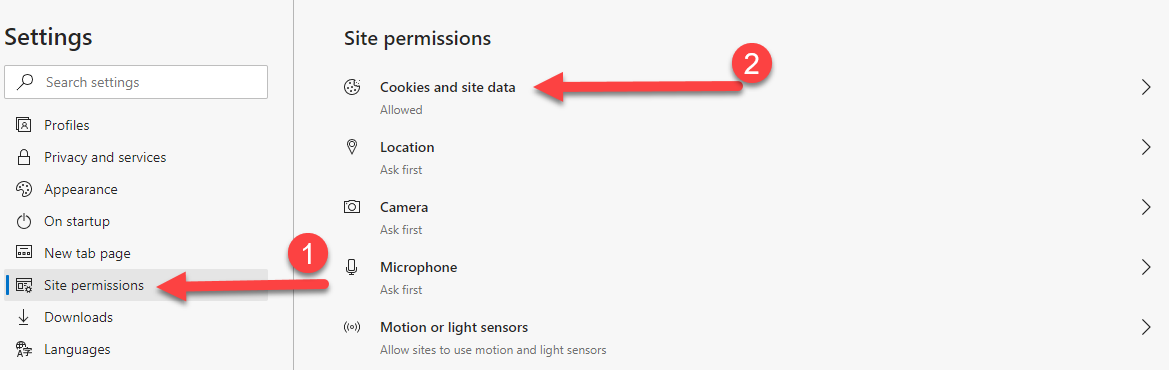
  1. At the top click on Cookies and site data.
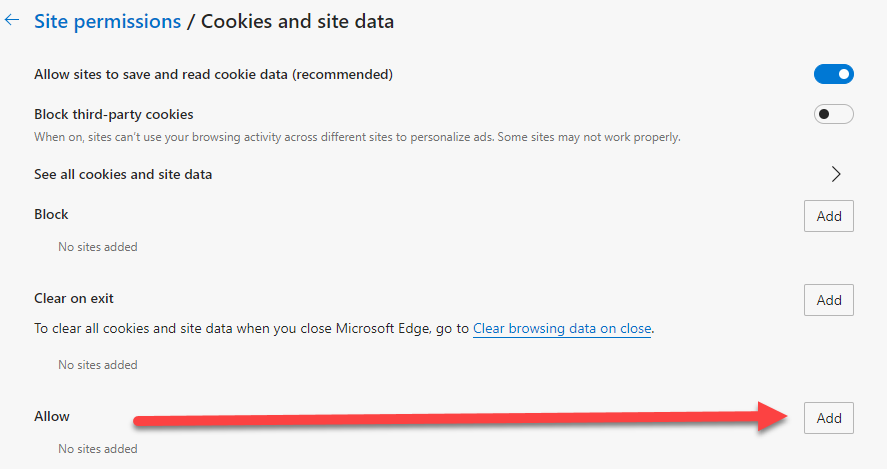
  2. Scroll down to where it says Allow and click ADD.
  1. Enter the site name you want to allow cookies for Input:   [*.]ri-bit-mck.com
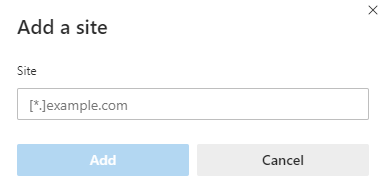
  1. Click Add and Close Settings
Was this article helpful?
0 out of 0 found this helpful
Have more questions? Submit a request
Return to top

Related articles

  • How to Use Ri-BIT Dashboards (ALL Suppliers)

Copyright © Front End Insights. All rights reserved.

Designed by Diziana
