Logo
Sign in
Submit a request
  1. Front End Insights
  2. FEI User Manual
  3. How to Enable Third Party Cookies

Menu

Articles in this section

  • RI-BIT Cookie Exception - IE

  • RI-BIT Cookie Exception - Firefox
  • RI-BIT Cookie Exception - Edge
  • RI-BIT Cookie Exception - Chrome

RI-BIT Cookie Exception - IE

INTERNET EXPLORER

 Select the gear in the upper-right corner of the screen, then select “Internet Options“. If you have the Menu Bar enabled, you can select “Tools“ > “Internet Options“.
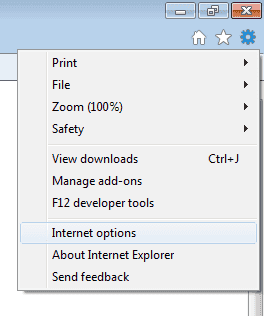

IE gear and Internet Options

  1. Click the “Privacy” tab.
  2. Select the “Sites” button. Under this section, type the website “ri-bit-mck.com” in the “Address of website” field, then select “Allow” cookies on that website.
  3. Repeat for www.frontend-insights.com
  4. Click “OK” when you are done.
  5. Click “OK” and you have successfully set your cookie settings in IE11.         


Was this article helpful?
0 out of 0 found this helpful
Have more questions? Submit a request
Return to top

Related articles

  • RI-BIT Cookie Exception - Edge

Copyright © Front End Insights. All rights reserved.

Designed by Diziana